Saturday, July 13, 2013

Configuring ACS as trust broker in SharePoint 2013 farm

Scenario: How to configure ACS as trust broker in SharePoint 2013 farm, to run Provider hosted apps with Azure Access Control (ACS) trust

Solution:
You can get the detailed manual steps to configure ACS from below link. This will give you an overall idea
http://www.google.com/url?sa=t&rct=j&q=&esrc=s&frm=1&source=web&cd=3&ved=0CDwQFjAC&url=http%3A%2F%2Fdownload.microsoft.com%2Fdownload%2F6%2F4%2F4%2F644BA525-96CB-4739-B08F-18949A9BDADC%2Fsps-2013-config-one-way-hybrid-environment.pdf&ei=Y3HgUfPyMIr1iQL6u4GACA&usg=AFQjCNGkhEKjXXtQNbR5f-nNj3FrylV5ww&sig2=c1oCRjsJMPaCtYpi6Gv2qw

OR if you have problem opening above link. you can search in Google with below title:-
Configure a one-way hybrid environment with SharePoint Server 2013 and Office 365

Below PowerShell Script automates the ACS configuration as explained in the above link:-
 
In the above PowerShell script, modify the below script variables as per your environment:-
 
$CertificatePathPfx="C:\Certificates\mycert.com.pfx"
$CertificatePathCer = "C:\Certificates\mycert.com.cer"
$CertificatePassword="Password"
$FarmFQDN = "*.con.com"
$SharePointTenantUri =  "https://con.sharepoint.com/"
$SharePointAzureTenantName ="con.microsoft.com"
$SPAppPrincipalId ="00000003-0000-0ff1-ce00-000000000000"

Note: After ACS configuration, if your SharePoint 2013 farm has a WAC server it may be disconnected. So office documents may not be saved to the farm. If you see this behavior, disconnect the WAC server from 2013 farm and re-join the server.

Friday, June 21, 2013

SharePoint2010: Creating Custom page in Central Administration

Scenario: Creating a custom Central administration page in 2010

Solution: Sample Admin UI Page

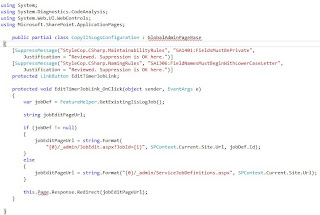
Sample Custom admin code behind
 
Adding Link to Custom Administration page:-

Friday, May 17, 2013

SharePoint how to place a check box and Dropdownlist in a webpart Tool pane\part

Scenario: How to place custom checkbox and dropdownlist in WebPart toolpane

Solution: Declare a new property of type "Enum" this will place a DropdownList.
For check box declare a property of type Boolean. Also Properties of type String, DateTime and Integer render a textbox.

 Useful webpart attributes when defining custom properties are:-
1. [WebBrowsable(true)]
2.[ Personalizable( PersonalizationScope.Shared)]
3.[WebDescription("")]
4.[WebDisplayname("")]
5.[ Category("")]

Tuesday, April 23, 2013

SharePoint 2013 Elivating app permissions beyond the user permissions

Scenario: How to alleviate app permissions, say for example you want your app to add an item to a list, but user using the app doesn't have write permissions on the list. So how can you still make an app add a list item, when run by a user with read only permissions on a list?

Solution: Well to achieve this do not use user permissions at all. Just use app-only permissions  to elevate the permissions of the app above the current user running the app.

We can achieve this by adding "AllowAppOnlyPolicy" attribute to "AppPermissionRequests". Using this approach we can create an app that does some job repetitively, similar to timer jobs.

For more detailed information on this topic refer:-
http://blogs.msdn.com/b/kaevans/archive/2013/02/23/sharepoint-2013-app-only-policy-made-easy.aspx

SharePoint2013 Note on AppPrincipal

AppPrincipal Indicates what kind of authentication an app requires and what type of app it is.

Various types of AppPrinciplas are:-
1. Internal: This is the default for SharePoint Hosted apps. Indicates that no external authentication is required.

Some times a cloud-hosted app can use "internal" auth when calling back using cross-domain library. To achieve this you should configure AppPrincipal  with "Internal" element with attribute "AllowedRemoteHostUrl".

2. RemoteWebApplication: This is the default for a Provider Hosted apps. Indicates that app requires external authentication like Oauth
3. AutoDeployedWebApplication: Indicates that App is autohosted and requires external authentication.

Saturday, April 20, 2013

SharePoint2013: Shopping Cart Provider hosted app prototype

Scenario: How to develop a shopping cart provider hosted app prototype using managed CSOM

Solution: Create a Provider Hosted App using "App for SharePoint2013" template

Add the following code in the remote web (web application) projects home\landing page (.aspx) within the "body\form" section.

Add the following code in remote webs home\landing page code behind.

Call the "RetrieveWithCSOM" function in Page_Load, passing it the accessToken.

The sample shopping cart prototype app UI looks like below
 
Note: If your Remote webapplication is located outside the firewall , you may see 401 error while remote webapplication is trying to talk back to SharePoint, in this scenario use Cross-domain library to talk back to SharePoint.

Friday, April 12, 2013

SharePoint2013 Provider hosted app with ACS trust unable to talk back to SharePoint with Error: The underlying connection was closed: Could not establish trust relationship for the SSL/TLS secure channel. Certificate error

Scenario: When your provider hosed apps remote app web\webapplication is trying to talk back to SharePoint you may receive an Error: The underlying connection was closed: Could not establish trust relationship for the SSL/TLS secure channel. Certificate error.

Resolution: Although you may get this error for several reasons with SharePoint, one that worked for me within the context of the apps is: Open the website in the browser and Install the certificate to the local machines trusted root authority, by clicking on the "Lock" icon in the browsers address bar.